
原文地址:https://test-bigdl-llm.readthedocs.io/en/main/doc/LLM/Quickstart/llama_cpp_quickstart.html#
以下是对提供内容的中文翻译,去除了影响阅读的 HTML 标签:
你可以通过以下链接查看运行在 Intel Arc GPU 上的 LLaMA2-7B 的演示。
注意
ipex-llm[cpp] 版本 2.5.0b20240527 与 llama.cpp 的 c780e75 一致。
我们当前的版本与 llama.cpp 的 62bfef5 一致。
快速开始#
这份快速入门指南将带你完成安装和运行 llama.cpp 与 ipex-llm 的过程。
0 前提条件#
IPEX-LLM 对 llama.cpp 的支持现在已经可以在 Linux 系统和 Windows 系统上使用。
Linux#
对于 Linux 系统,我们推荐使用 Ubuntu 20.04 或更高版本(首选 Ubuntu 22.04)。
访问 在装有 Intel GPU 的 Linux 上安装 IPEX-LLM,按照 安装 Intel GPU 驱动程序 和 安装 oneAPI 来安装 GPU 驱动程序和 Intel® oneAPI Base Toolkit 2024.0。
Windows(可选)#
IPEX-LLM 后端对 llama.cpp 仅支持较新的 GPU 驱动程序。请确保你的 GPU 驱动程序版本等于或更新于 31.0.101.5333,否则你可能会看到乱码输出。
如果你的 GPU 驱动程序版本较低,请访问 在装有 Intel GPU 的 Windows 上安装 IPEX-LLM 指南,并按照 更新 GPU 驱动程序。
1 安装 IPEX-LLM for llama.cpp#
要使用 llama.cpp 与 IPEX-LLM,首先确保已安装 ipex-llm[cpp]。
LinuxWindows
conda create -n llm-cpp python=3.11
conda activate llm-cpp
pip install --pre --upgrade ipex-llm[cpp]
复制到剪贴板
请在 Miniforge Prompt 中运行以下命令。
conda create -n llm-cpp python=3.11
conda activate llm-cpp
pip install --pre --upgrade ipex-llm[cpp]
复制到剪贴板
安装完成后,你应该已经创建了一个名为 llm-cpp 的 conda 环境,用于运行带有 IPEX-LLM 的 llama.cpp 命令。
2 设置运行 llama.cpp#
首先,你应该创建一个目录来使用 llama.cpp,例如,使用以下命令创建一个 llama-cpp 目录并进入它。
mkdir llama-cpp
cd llama-cpp
复制到剪贴板
使用 IPEX-LLM 初始化 llama.cpp#
然后,你可以使用以下命令使用 IPEX-LLM 初始化 llama.cpp:
LinuxWindows
init-llama-cpp复制到剪贴板
在运行 init-llama-cpp 后,你应该在当前目录中看到许多 llama.cpp 的可执行文件的软链接和一个 convert.py。

请在 Miniforge Prompt 中以 管理员权限运行以下命令。
init-llama-cpp.bat复制到剪贴板
在运行 init-llama-cpp.bat 后,你应该在当前目录中看到许多 llama.cpp 的可执行文件的软链接和一个 convert.py。
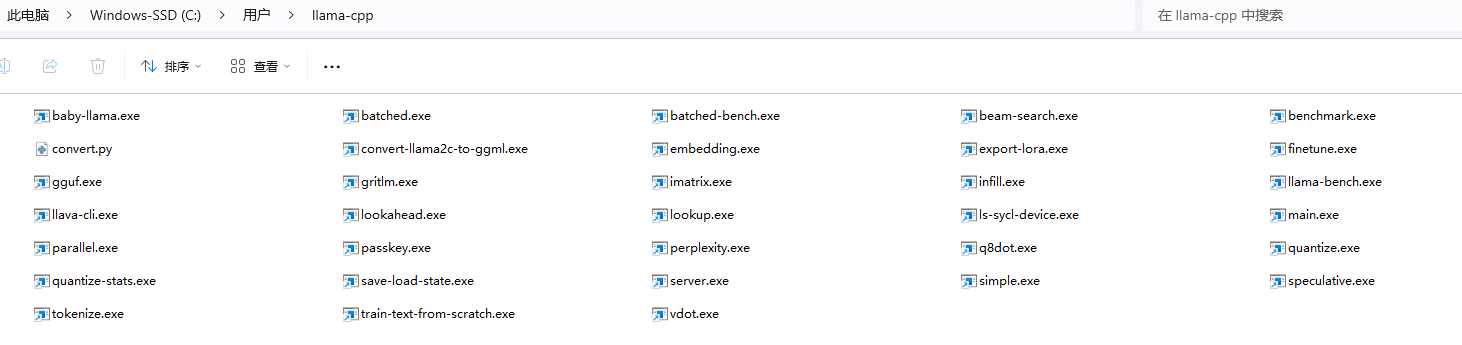
注意
init-llama-cpp 会在当前目录中创建 llama.cpp 的可执行文件的软链接,如果你想在其他地方使用这些可执行文件,不要忘记再次运行上述命令。
注意
如果你安装了更高版本的 ipex-llm[cpp] 并想要升级你的二进制文件,不要忘记先删除旧的二进制文件,然后再次使用 init-llama-cpp 或 init-llama-cpp.bat 初始化。
现在你可以按照标准的 llama.cpp 用法使用这些可执行文件。
运行时配置#
要使用 GPU 加速,在运行 llama.cpp 之前需要设置几个环境变量。
LinuxWindows
source /opt/intel/oneapi/setvars.sh
export SYCL_CACHE_PERSISTENT=1
复制到剪贴板
请在 Miniforge Prompt 中运行以下命令。
set SYCL_CACHE_PERSISTENT=1复制到剪贴板
提示
如果你的本地 LLM 在装有 Linux 操作系统(内核 6.2)的 Intel Arc™ A-Series 图形上运行,建议额外设置以下环境变量以获得最佳性能:
export SYCL_PI_LEVEL_ZERO_USE_IMMEDIATE_COMMANDLISTS=1复制到剪贴板
3 示例:使用 IPEX-LLM 运行社区 GGUF 模型#
这里我们提供一个简单的示例,展示如何使用 IPEX-LLM 运行社区 GGUF 模型。
模型下载#
在运行之前,你应该下载或复制社区 GGUF 模型到你当前的目录。例如,Mistral-7B-Instruct-v0.1-GGUF 的 mistral-7b-instruct-v0.1.Q4_K_M.gguf。
运行量化模型#
LinuxWindows
./main -m mistral-7b-instruct-v0.1.Q4_K_M.gguf -n 32 --prompt "Once upon a time, there existed a little girl who liked to have adventures. She wanted to go to places and meet new people, and have fun" -t 8 -e -ngl 33 --color复制到剪贴板
有关每个参数含义的更多详细信息,你可以使用 ./main -h。
请在 Miniforge Prompt 中运行以下命令。
main -m mistral-7b-instruct-v0.1.Q4_K_M.gguf -n 32 --prompt "Once upon a time, there existed a little girl who liked to have adventures. She wanted to go to places and meet new people, and have fun" -t 8 -e -ngl 33 --color复制到剪贴板
有关每个参数含义的更多详细信息,你可以使用 main -h。
示例输出#
Log start
main: build = 1 (38bcbd4)
main: built with Intel(R) oneAPI DPC++/C++ Compiler 2024.0.0 (2024.0.0.20231017) for x86_64-unknown-linux-gnu
main: seed  = 1710359960
ggml_init_sycl: GGML_SYCL_DEBUG: 0
ggml_init_sycl: GGML_SYCL_F16: no
found 8 SYCL devices:
|ID| Name                                        | compute capability | Max compute units | Max work group | Max sub group | Global mem size |
|--|---------------------------------------------|------------------|-----------------|--------------|-------------|---------------|
| 0| Intel(R) Arc(TM) A770 Graphics            | 1.3              | 512              | 1024          | 32           | 16225243136   |
| 1| Intel(R) FPGA Emulation Device           | 1.2              | 32               | 67108864      | 64           | 67181625344   |
| 2| 13th Gen Intel(R) Core(TM) i9-13900K     | 3.0              | 32               | 8192          | 64           | 67181625344   |
| 3| Intel(R) Arc(TM) A770 Graphics            | 3.0              | 512              | 1024          | 32           | 16225243136   |
| 4| Intel(R) Arc(TM) A770 Graphics            | 3.0              | 512              | 1024          | 32           | 16225243136   |
| 5| Intel(R) UHD Graphics 770                  | 3.0              | 32               | 512           | 32           | 53745299456   |
| 6| Intel(R) Arc(TM) A770 Graphics            | 1.3              | 512              | 1024          | 32           | 16225243136   |
| 7| Intel(R) UHD Graphics 770                  | 1.3              | 32               | 512           | 32           | 53745299456   |
detect 2 SYCL GPUs: [0,6] with Max compute units: 512
llama_model_loader: loaded meta data with 20 key-value pairs and 291 tensors from ~/mistral-7b-instruct-v0.1.Q4_K_M.gguf (version GGUF V2)
llama_model_loader: Dumping metadata keys/values. Note: KV overrides do not apply in this output.
llama_model_loader: - kv 0: general.architecture str = llama
llama_model_loader: - kv 1: general.name str = mistralai_mistral-7-b-instruct-v0.1
...(此处省略部分输出内容)...
llama_print_timings:        total time =    xx.xx ms /    62 tokens
Log end
Comments | NOTHING